Mining Search Console queries for pages that already rank: what the data shows and what it hides
A method for finding the searches a page already appears for, deciding which ones deserve a section or a new page, and measuring the result. Each step is checked against Google's Search Console documentation, including the limits that make keyword lists incomplete.
A page that already gets impressions is showing you the words people used to find it. Search Console records those queries, and many of them never appear in a third-party keyword tool. Turning them into better pages is one of the most widely recommended tactics in SEO, and Google publishes its own version of the idea.
The tactic is sound. The version usually taught ends with two habits that Google's documentation qualifies, and the data has gaps that change how you should read it. This article sets out the method with each step checked against Google's own pages.
Sources checked October 13, 2026. This is RankPropel's working method, not a ranking result. Nothing here guarantees that a page will rank for more queries after you edit it.
What the Performance report measures
The Search results report shows four metrics: clicks, impressions, click-through rate and average position. Average position is the topmost position your link held for each impression, averaged across impressions, so a page that sometimes shows at position 3 and sometimes at 30 can report 12 without ever sitting at 12. Google's metric definitions.
You can group the data by query, page, country, device, search appearance and date. The default view covers the past three months. Performance report overview.
Google also states that the query list may not match what you see when you search yourself, because results depend on the searcher's time, place, device and history. Do not check a query once in your own browser and conclude the data is wrong.
What the report leaves out
Three limits decide how far you can trust a query list.
| Limit | What Google documents | What it means for this method |
|---|---|---|
| Anonymized queries | Queries not issued by more than a few dozen users over two to three months are omitted from tables. They still count in chart totals, unless you filter by query. | The rarest long-tail searches are missing. A query filter shrinks totals, so filtered numbers are a floor, not a share. |
| Row limits | The interface exports at most 1,000 rows. The API returns 1,000 rows by default and up to 25,000 per request, with paging. | A large site's export from the interface is a sample of its top rows. Use the API or bulk export for a full list. |
| Bulk export | The BigQuery bulk export includes all performance data available to Search Console, except anonymized queries. | The most complete query source Google offers, still without the private long tail. |
Sources: Google's 2022 deep dive on performance data (anonymization and the interface row cap), Search Analytics API reference (row limits, page dated August 2026), and bulk data export.
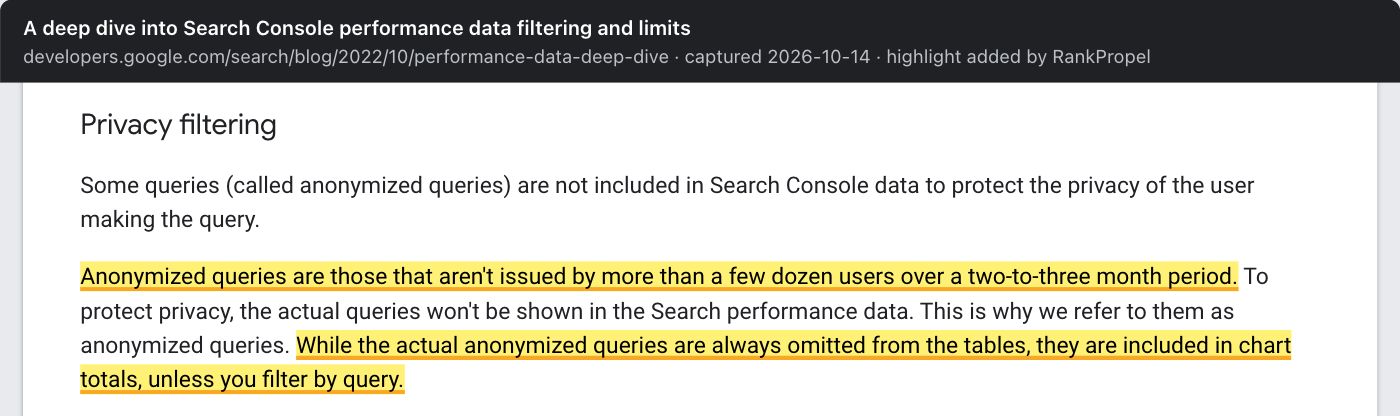
Source: Google Search Central Blog, A deep dive into Search Console performance data filtering and limits, captured October 14, 2026. Highlight added by RankPropel. Licensed CC BY 4.0.
The 2022 post also gave a per-day ceiling for API and Looker Studio exports of 50,000 rows per site per search type. That figure is four years old; treat it as dated until Google repeats it.
Why the long tail matters: Google said in 2019 that about 15% of the searches it sees each day are new. Google's BERT announcement, October 2019. Many of those will never show up in a keyword tool or in your table.
AI features are in the totals, without a query table
AI Overviews and AI Mode impressions are counted inside the main Web report. Since June 2026 Google has also shown them in a separate Generative AI report, rolled out to all sites by August 31, 2026. The separate view repeats impressions already in the totals, so adding the two double-counts. Google's announcement.
The report's help page lists pages, countries, dates and devices as dimensions, with impressions as the metric. It lists no query dimension. Generative AI report help. You cannot yet mine AI-feature queries the way this article describes. Do not label a query as an "AI query" from the main report.
The method
1. Start from pages, not keywords
Pick pages that already earn impressions and matter to the business: product, pricing, comparison, integration and well-performing guides. In the report, filter by one page, open the Queries tab and set the date range to three months. If the page has more than about 1,000 queries, pull them from the API or the bulk export instead of the interface.
2. Sort queries the way Google's own guide does
Google's bubble chart guide plots each query by average position and CTR, splits the chart at your site's averages and reads four groups:
| Group | Google's suggested reading | Our action |
|---|---|---|
| High position, high CTR | Already working. | Leave alone. |
| Lower position, high CTR | Relevant to users; moving up could matter. If no page covers the topic, consider creating one. If a page does, consider adding content that better addresses the need. | Main candidates for a new section. |
| Low CTR (any position) | Split into related queries, worth prioritising because the page already appears, and unrelated ones. | Keep related queries; drop unrelated ones. |
| High position, low CTR | Competitors may show richer results, or the page may rank for something users do not want from you. | Check the results page before editing anything. |
The split uses your site's own averages. Google gives no fixed "striking distance" band. Ranges often recommended in the industry, such as positions 7–20 or 8–15, are useful filters to try. They are not Google thresholds.
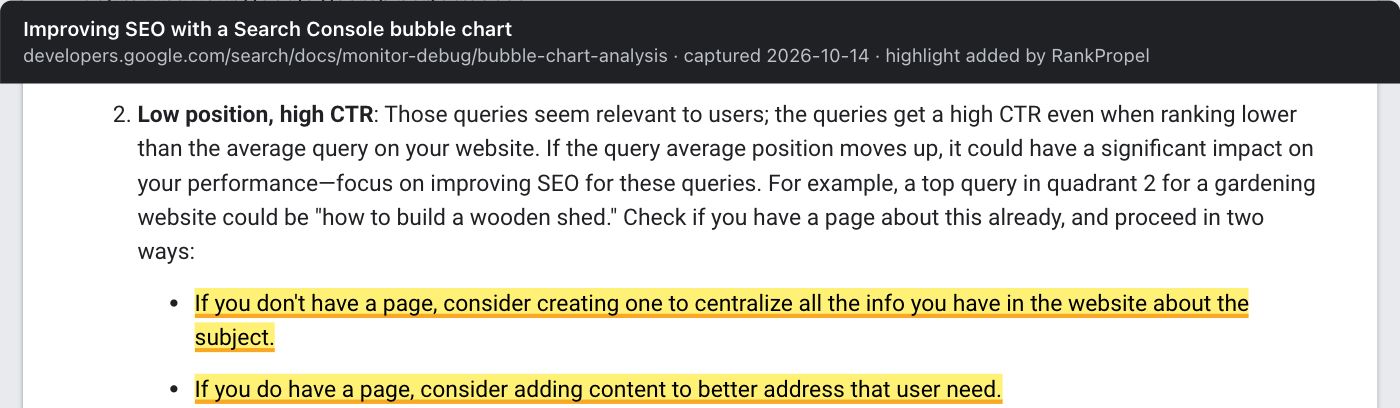
Source: Google Search Central, Improving SEO with a Search Console bubble chart, captured October 14, 2026. Highlight added by RankPropel. Licensed CC BY 4.0.
3. Find query classes with regex
Search Console's custom regex filter uses RE2 syntax. A pattern matches anywhere in the query unless you anchor it with ^ or $, and matching ignores case by default. "Doesn't match regex" excludes a pattern. Regex filter help. Three starting patterns:
- Comparison intent:
\b(vs|versus|alternative|alternatives|compared)\b - Question-shaped queries:
^(how|what|why|when|can|does|is|which)\b - Long, conversational queries (seven words or more):
^(\S+\s+){6,}\S+$
These patterns are our method. They only find queries that appear in the table, and filtering by query removes anonymized queries from the totals.
4. Decide per query: section, new page or nothing
For each kept query, ask what the searcher needs that the page does not yet give them.
- Same need, missing detail: add a section, a table row or a worked example to the existing page.
- Different need: consider a separate page, but only if it would stand on its own. Pages that differ only by the keyword, built to catch variations, fall under Google's doorway and scaled content policies.
- Unrelated: ignore it.
You do not need to place every variant verbatim. Google's SEO Starter Guide suggests anticipating the words readers use, then adds that its language-matching systems can connect a page to queries it never states word for word. The same guide says content length alone does not matter and that keyword stuffing breaks the spam policies. Write for the reader the query represents.
5. Edit, then date honestly
The common step-by-step version of this routine ends with two steps: change the page's published date, then request indexing in Search Console. Google's documentation qualifies both.
- Dates. Google's people-first content guidance lists, as a warning sign, changing a page's date to make it seem fresh when the content has not substantially changed. Helpful content guidance. Its byline-date guidance asks for a visible date labelled with text such as "Last updated", consistent with structured data. Byline dates. Changing the date after a substantial update is consistent with that guidance. The risk is doing it after every small edit. Our rule: keep the original published date, and add or change a "Last updated" date only when the edit changes what a reader learns.
- Request indexing. Allowed for a few URLs, but Google says crawling can take days to weeks and a request does not guarantee inclusion. Ask Google to recrawl. Submitting is fine. Do not read any rise in the next few days as caused by the request.
6. Measure against pages you did not touch
Record the edit date and the queries you targeted. After four to eight weeks, compare those queries' impressions, position and clicks for the edited page with the same window before the edit, and with a few similar pages you left alone. Annotate known Google updates in the window. A before-and-after change on one page does not establish cause.
What the evidence does not show
- Google does not say that adding Search Console queries to a page will make it rank for them. Its bubble chart guide frames added content as better serving a need.
- We found no Google statement on how much a "Last updated" change, or a recrawl request, affects ranking. The documentation warns against cosmetic date changes and promises nothing about requests.
- Search Console does not show AI-feature queries, so this method cannot target AI Overviews or AI Mode specifically.
Checklist
- Pages chosen by business value, each with three months of query data
- Full query list from the API or bulk export where the interface hits 1,000 rows
- Queries sorted against your own site averages, not a fixed position band
- Each query marked section, new page or ignore, with a reason
- No near-duplicate pages created for keyword variants
- Original published date kept; updated date only for substantive edits
- Edit date recorded; comparison pages chosen before measuring
For the diagnosis side of the same report, see our page-2 CTR case study. For what click data can and cannot do in ranking, see Do clicks rank pages?.