From zero to indexed: a launch-day checklist for a content site (with the bug we almost shipped)
A redacted launch record by LIPAI WANG: provisioning, one canonical host, HTTPS, Search Console DNS verification, sitemaps, Bing import and IndexNow, plus the empty-index bug a live link count caught before any crawler did.
This is the launch-day record for Case C, the owner-operated long-form B2B reference guide from the pre-launch AI search readiness case study. The work was done by LIPAI WANG on October 3, 2026. The site's name, domain and subject are withheld, and Case C is not presented as a client endorsement.
It covers one day: from an empty cloud account to a live site that Google and Bing know about. It includes a bug that would have shipped empty index pages and a 14-URL sitemap to every crawler, and how a two-minute check caught it.
What the evidence shows: each step was done and verified, with command output and screenshots kept privately. What it does not show: rankings, traffic, indexed page counts or AI citations. On launch day there were none. Requesting indexing and pinging IndexNow are requests, not results.
The site runs on Next.js with the OpenNext adapter on Cloudflare Workers, with content in a D1 database, the incremental cache and media in R2 buckets, and index pages served with incremental static regeneration (ISR). The steps carry over to other stacks. The bug is specific to "build reads a database" setups, which are common.
Every verification command below uses example.com. Replace it with your own domain.
Step 1: provision storage, then deploy to both hostnames
What we did. Created the production database, created two object storage buckets (one for the ISR cache, one for media), applied the two schema migrations to the remote database, synced the 55 Markdown source documents into it, then deployed the Worker with two custom domains: the apex and www.
Why both hostnames. People type www. Links from other sites use it. If www does not resolve, those visits fail before any redirect can help. Attach both, then pick one as canonical (step 2).
How to verify.
curl -s -o /dev/null -w "%{http_code} %{time_total}s\n" https://example.com/
curl -s -o /dev/null -w "%{http_code}\n" https://example.com/does-not-exist   # expect 404, not 200
curl -s -o /dev/null -w "%{http_code}\n" https://example.com/robots.txt
curl -s -o /dev/null -w "%{http_code}\n" https://example.com/sitemap.xml
Case C returned 200 for the home page, a chapter, an article, an author page, robots.txt, the sitemap, llms.txt, a figure, the logo and the social image route, and 404 for a made-up path. A missing page that returns 200 is a soft 404, so check that one explicitly.
All of those checks passed. The site was still broken, as step 4 shows.
Step 2: one canonical host and HTTPS everywhere
What we did. www redirects to the apex with a permanent 308 that keeps the path and query string. This is an app-level redirect rule that matches on the Host header. Plain HTTP redirects to HTTPS with a 301 through Cloudflare's Always Use HTTPS setting. The API token in use lacked zone-settings permission, so the setting was switched on in the dashboard.
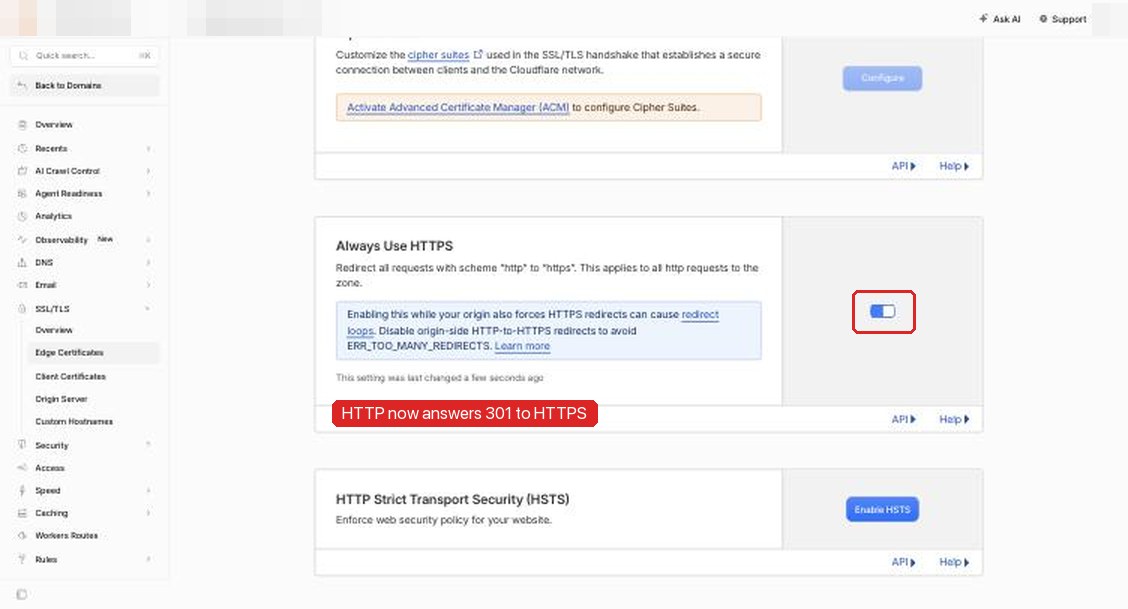
Why. Google's canonicalization guide lists redirects as a strong signal that the target should become canonical, alongside rel="canonical", with sitemap inclusion as a weak signal. Its redirects page treats 301 and 308 as permanent. Four host and protocol variants of every URL become one. The sitemap, canonical tags and internal links all use that same one, so the signals agree.
How to verify.
curl -sI "https://www.example.com/guide?x=1" | grep -iE "^(HTTP|location)"
# HTTP/2 308
# location: https://example.com/guide?x=1

curl -sI "http://example.com/guide" | grep -iE "^(HTTP|location)"
# HTTP/1.1 301 Moved Permanently
# Location: https://example.com/guide

curl -s https://example.com/guide | grep -o '<link rel="canonical"[^>]*>'
One caution from Cloudflare's own setting page: if your origin also forces HTTPS, you can create a redirect loop. On Workers there is no separate origin, but check the response chain once with curl -sIL.
Step 3: make the published contact address actually receive mail
What we did. The site publishes an editor contact address on its contact and editorial policy pages. We set up Cloudflare Email Routing to forward it to a monitored inbox. Enabling it added the MX and SPF records.
Why. It is not a ranking factor. It matters because a published address that bounces breaks trust with readers, sources and anyone reporting an error. An editorial policy that promises corrections needs a working inbox behind it.
How to verify.
dig +short MX example.com
dig +short TXT example.com | grep spf
Then send a real message from a different account and confirm it arrives.
Step 4: the bug we almost shipped
The HTTP checks in step 1 only proved that pages responded. The next check counted what was on them:
for p in / /guide /articles; do
  printf "%s links=" "$p"
  curl -s "https://example.com$p" | grep -o 'href="/guide/[^"]*"' | wc -l
done

curl -s https://example.com/sitemap.xml | grep -c "<loc>"
The guide's hub page had 0 chapter links. The sitemap had 14 URLs where it should have had 68. The 14 were the fixed pages (home, about, policies and the like). Every chapter, article and profile was missing. The RSS feed and llms.txt, which are built from the same lists, were empty too.
The cause. Index pages, the sitemap, the feed and llms.txt are prerendered at build time, then refreshed hourly by ISR. At build time, the database binding points to a local copy of the database. That local copy is stored per database ID. Going live meant replacing the placeholder ID in the config with the new production database ID. The content had been synced to the remote production database, and the build then opened a brand-new, empty local database under the new ID.
Two things turned that into a silent failure:
- The list query returned an empty list on any error or missing binding, so an empty database looked the same as "no content yet".
- The build succeeded. Nothing failed, so the deploy went out with empty prerendered pages.
ISR would have repaired the pages within an hour, once a request triggered revalidation against the production database. That hour fell on the same day we planned to submit the sitemap and request indexing. A sitemap with only 14 boilerplate URLs, fetched at the moment of first submission, is a poor first impression.
The fix. Three changes, each aimed at one way of failing:
- Load local data before every build. The deploy script now runs the local migration and content sync first, then a guard script that counts published documents of each type in the local database. If any type is zero, it exits with an error and the build never starts.
- Retry at build time, then fail the build. Parallel prerender workers share one local SQLite file, which can briefly be locked. Queries at build time retry up to five times with backoff. If they still fail, the error propagates and the build fails. A failed build is better than a deployed empty page.
- No silent empty lists at runtime. At runtime, database errors now propagate instead of returning
[]. When an ISR revalidation throws, the framework keeps serving the last good version of the page instead of caching an empty list. The hub page also got a reader-facing empty state ("being updated") in case the list is ever legitimately empty.
After the fix. Three redeploys later (one hit a retryable cache-write error and was rerun), the live sitemap listed 68 URLs and 14 image URLs, and the hub page had 17 chapter links.
The reusable lesson. If your build reads data, a successful build is not proof of a correct build. Add one content assertion before the build and one after the deploy: a count of items in a list page and a count of <loc> entries in the sitemap, compared with the number you expect. That check takes two minutes and caught this bug. Status codes did not.
Step 5: verify a Search Console domain property with a DNS TXT record
What we did. Added a Domain property, not a URL-prefix property. Search Console offered a one-click flow for the site's DNS provider, which asks you to sign in to the DNS provider and grant Google access to the account. We declined it and chose "Any DNS provider". Then we added the TXT record by hand and clicked Verify.
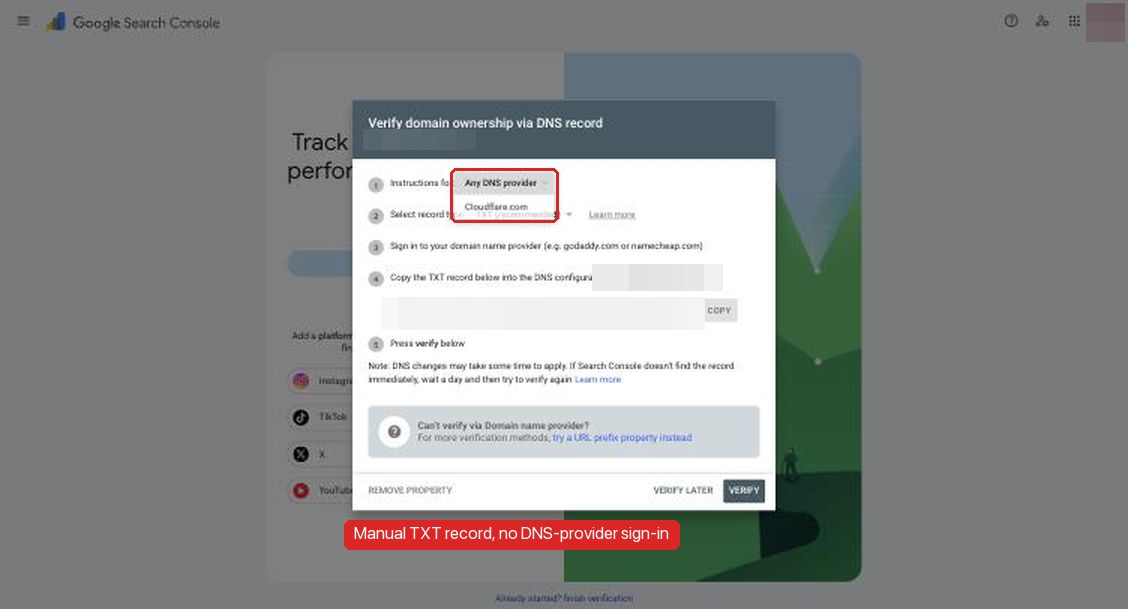
Why a domain property. Google's verification help says DNS verification is the only way to verify a Domain property, and that Domain properties include all protocol and subdomain variants. That means the www and http variants from step 2 also show up in reports. If a redirect ever breaks, you will see it.
Why manual TXT over one-click. The one-click flow is faster. But it grants a third party access to the DNS account, which controls mail routing, certificates and every subdomain, and the grant stays in place after you finish. A TXT record takes two minutes and grants nothing. Keep the record in place afterward: Search Console checks it periodically, and removing it un-verifies the property.
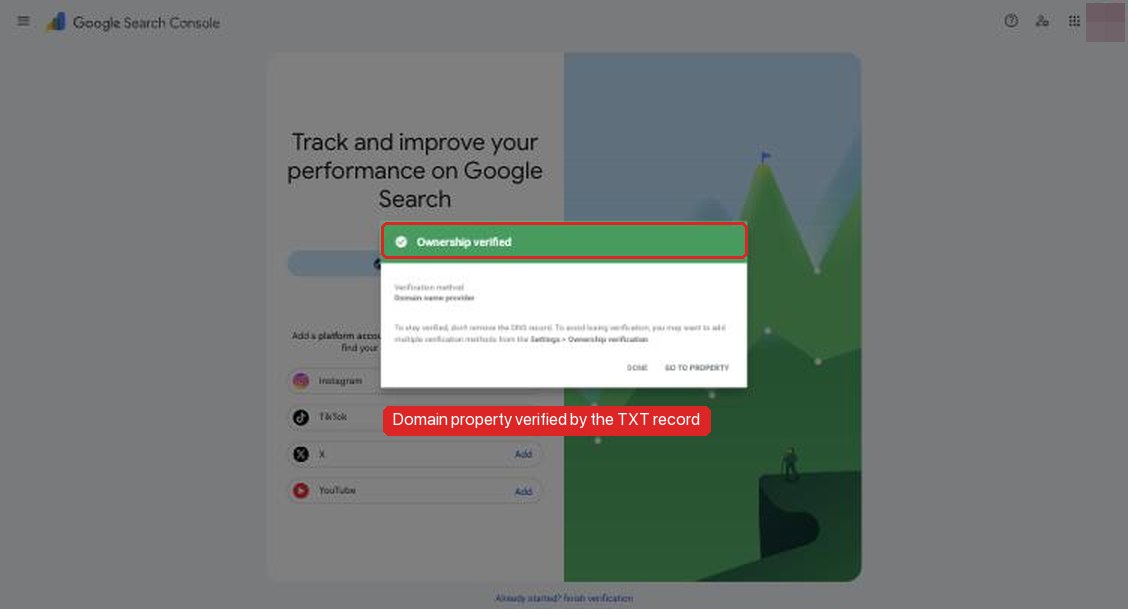
How to verify.
dig +short TXT example.com | grep google-site-verification
If the record is not visible yet, wait. DNS propagation can take minutes to hours.
The mistake we made next. We verified the property in the wrong Google account. The browser had several accounts signed in, and Search Console opened in one that held no other properties, while the rest of the owner's sites lived in another account. Nothing breaks when this happens, but reports end up split across accounts and access is easy to lose later. The fix is cheap: open Search Console in the account that should own the site, add the same Domain property there, and add that account's own TXT record next to the first one. Each verified account keeps its own record. Check the avatar and the property list before you click Add property, not after.
Step 6: submit the sitemap, and why it first said "Couldn't fetch"
What we did. Submitted https://example.com/sitemap.xml in the Sitemaps report. The confirmation said the sitemap was submitted successfully. The table showed status Couldn't fetch with 0 discovered pages.
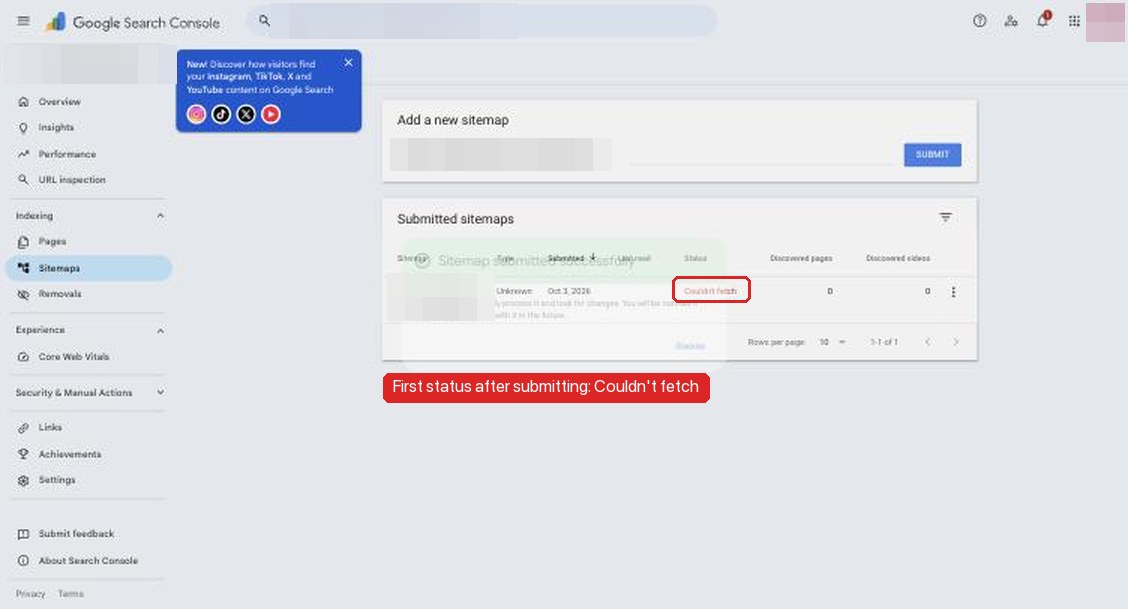
Why it happened, and what we can and cannot say. Google's sitemaps report help defines Couldn't fetch as "Google couldn't fetch the sitemap" and lists causes such as robots.txt blocking or the sitemap URL being wrong. None applied. The sitemap returned 200, was allowed in robots.txt and was listed there. Two things were true at the time. The property was minutes old, and the first submission went in while the live sitemap still had the broken 14-URL version. We cannot tell from the report which, if either, caused the status. "Couldn't fetch" on a brand-new property often clears without changes. We resubmitted after the fix, and the honest launch-day status is "not yet fetched successfully". It goes on the watch list for step 10.
Google's sitemap guide asks for fully qualified absolute URLs and sets limits of 50,000 URLs or 50MB per file. Also list the sitemap in robots.txt, so crawlers that never see your Search Console submission still find it.
How to verify.
curl -s -o /dev/null -w "%{http_code} %{content_type}\n" https://example.com/sitemap.xml
curl -s https://example.com/robots.txt | grep -i sitemap
curl -s https://example.com/sitemap.xml | grep -o "<loc>[^<]*</loc>" | grep -vc "https://example.com"   # expect 0
The last command counts URLs on the wrong host or protocol. It should be zero, so the sitemap agrees with step 2.
Step 7: request indexing for the home page and the hub only
What we did. Ran URL Inspection on the home page and on the guide's hub page. Both showed "URL is not on Google", which is expected on day one. We clicked Request indexing for each and stopped there.
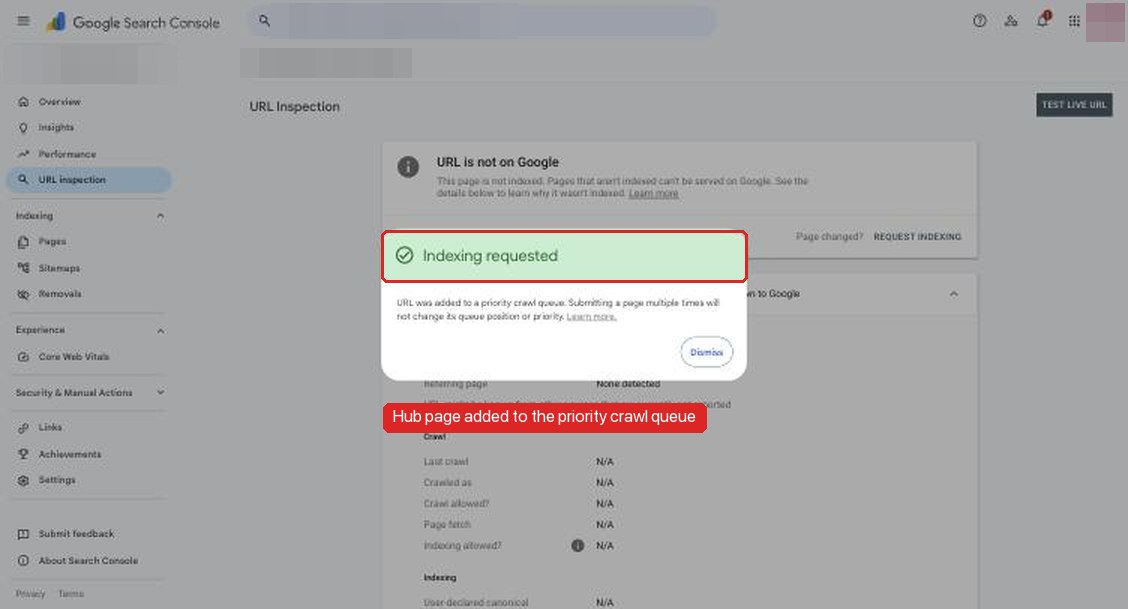
Why only two. Google's URL Inspection help notes a daily limit on requests per property. Its recrawl guide says to use URL Inspection for a few URLs and a sitemap for many. It also says repeat requests do not speed anything up, and requesting a crawl does not guarantee inclusion. The home page and the hub link to every chapter, article and profile, so a crawler that reaches them can discover the rest by following links. The sitemap covers the remaining URLs. Requesting indexing for all 68 one at a time would burn quota and add no new signal.
"Indexing requested" means queued for a crawl. It does not mean indexed.
Step 8: add the site to Bing Webmaster Tools by importing from Search Console
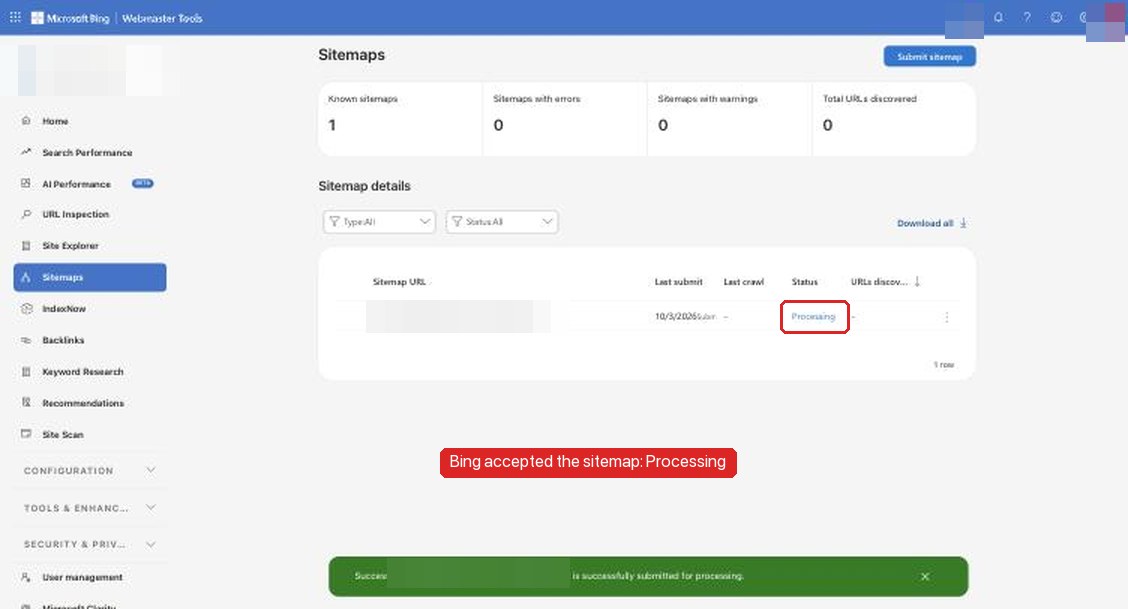
What we did. In Bing Webmaster Tools, chose Import from Google Search Console. We signed in with Google, approved access, selected the one verified property and imported it. Then we submitted the sitemap in Bing.
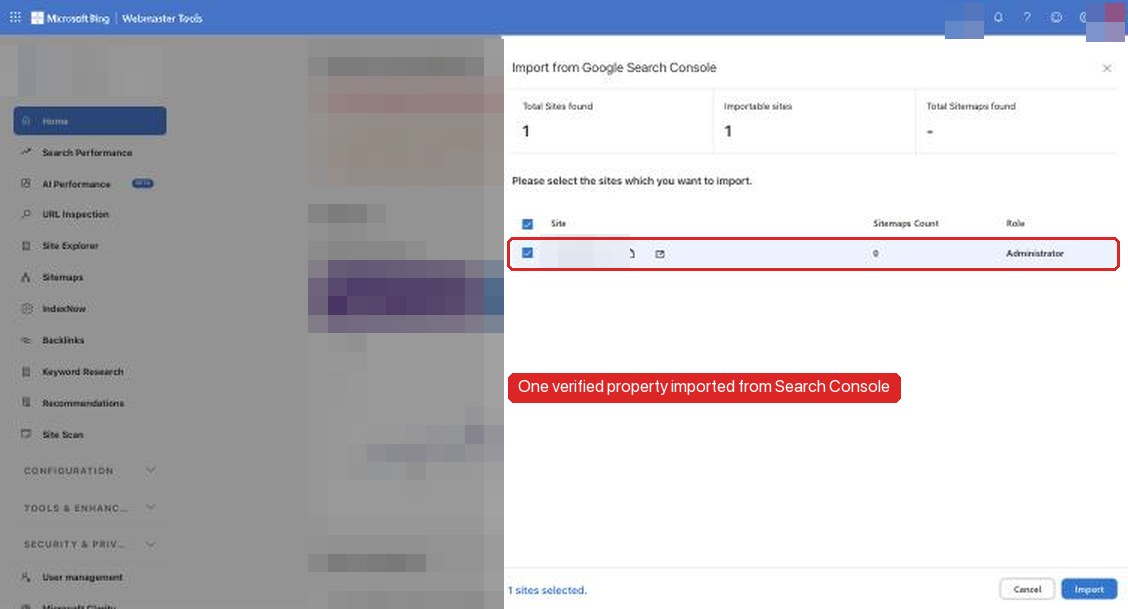
Why import. Bing's import announcement (updated June 2025) says imported sites are verified automatically. The consent step gives Bing access to your list of verified sites and sitemaps. That is read-only access to Search Console data, not access to your DNS. Read the consent screen before you approve it. If it asks for more than reading sites and sitemaps, stop. Bing also powers other search and AI experiences, so being verified there is part of launch, not an afterthought.
One thing to watch: the import dialog lists every property your Google account can see. If one account manages several sites, check that you import only the one you mean.
Step 9: IndexNow for Bing and other participating engines
What we did. Generated an IndexNow key, published it as a text file at the site root, and wrote a small script. The script reads every <loc> from the live sitemap and POSTs the list to the shared endpoint. It ran once after the final deploy: 68 URLs, HTTP 202. We covered the Cloudflare one-click option in an earlier IndexNow article. A script gives you control over when it fires and which URLs it sends.
What 202 means. The IndexNow documentation lists 200 as "URL submitted successfully" and 202 as "Accepted", meaning the URLs were received and key validation is pending. Neither code means crawled or indexed. Google does not take part in IndexNow, so this step does nothing for Google.
How to verify.
# The key file must return exactly the key, as plain text, from the canonical host
curl -s https://example.com/<your-key>.txt

curl -s -o /dev/null -w "%{http_code}\n" -X POST https://api.indexnow.org/indexnow \
  -H "content-type: application/json; charset=utf-8" \
  -d '{"host":"example.com","key":"<your-key>","keyLocation":"https://example.com/<your-key>.txt","urlList":["https://example.com/"]}'
A 403 means the key file was not found or does not match. A 422 means a URL does not belong to the host. Re-run the script after content changes, not on a timer.
Step 10: what to watch over the next four weeks
Nothing from launch day can be measured yet. These are the checks we scheduled, with what would count as progress or a problem:
| When | Where | What to look for |
|---|---|---|
| Days 2 to 7 | Sitemaps report (Google) | Status moves from Couldn't fetch to Success, and discovered pages approaches 68. If it stays Couldn't fetch, follow the fetch error checklist. |
| Days 2 to 7 | Bing Sitemaps | Status leaves Processing. URLs discovered becomes nonzero. |
| Weekly | Page indexing report | Indexed count rising. Read "Discovered, currently not indexed" and "Crawled, currently not indexed" as normal early states, not errors. Investigate any "Duplicate, Google chose different canonical" or "Page with redirect" rows, which would point back to step 2. |
| Weekly | Crawl stats | Requests by response code. Expect mostly 200, some 301 and 308 from old variants, and no 5xx. |
| From first impressions | Performance, plus the generative AI report | Separate visibility in AI Overviews, AI Mode and generative features in Discover from classic results. Use the multimodal filter to see whether the figures from the pre-launch work surface in image-based searches. |
| Any time | URL Inspection on a few deep pages | Spot-check that Google sees the user-declared canonical you expect. |
A caveat on timing. The Search Status Dashboard still listed the September 2026 spam update as active on launch day. It started on September 24. Any early movement in impressions during the rollout cannot be separated from the update, so the baseline is annotated with it. A new site has no pre-update history to compare against anyway.
What this record does not show
- It does not show that any page is indexed, ranks or gets cited. Launch day ended with indexing requested, sitemaps submitted and an IndexNow 202.
- It does not prove the first "Couldn't fetch" was caused by the empty sitemap. The two happened at the same time.
- It does not show that the manual TXT route or the domain property changes any search outcome. Those were choices about security and visibility, not ranking.
- Four weeks of data will be one site on one stack in one month, during a spam update. Any follow-up will report it as an observation, not a controlled test.
Launch checklist
- Create the database and buckets, apply migrations, load content into production and into whatever the build reads.
- Deploy with both apex and
wwwattached. Check 200s on key pages and a real 404 on a made-up path. - Pick one canonical host:
wwwto apex (or the reverse) with a permanent redirect that keeps the path, and HTTP to HTTPS with a 301. Confirm withcurl -sI. - Make sure canonical tags, sitemap URLs and internal links all use that host.
- Route the published contact address to a monitored inbox, and send a test message.
- Count content, not just status codes: links on each index page and
<loc>entries in the sitemap, compared with the expected number. - Make the build fail on missing data. Let runtime errors propagate so ISR keeps the last good page.
- Confirm which Google account you are in, then verify a Search Console Domain property with a manual DNS TXT record, and leave the record in place.
- Submit the sitemap. Treat an early "Couldn't fetch" on a new property as something to recheck, not to panic over.
- Request indexing for the home page and the main hub only.
- Import the property into Bing Webmaster Tools, read the consent scope, and submit the sitemap there.
- Publish an IndexNow key, submit the sitemap URLs once, and read 202 as "accepted".
- Put the four-week checks on a calendar, and note any active Google updates next to your baseline.