What RankPropel can and cannot see when your agent uses it
A plain-language guide to the RankPropel MCP service's data boundary: your agent sends public page HTML, RankPropel returns advice, and your code, CMS and hosting stay on your side.
A fair first question about any SEO tool that plugs into an AI agent: will it read my source code? With RankPropel the answer is no, by design. The service gives advice. It does not connect to your systems, and your agent decides exactly what to send.
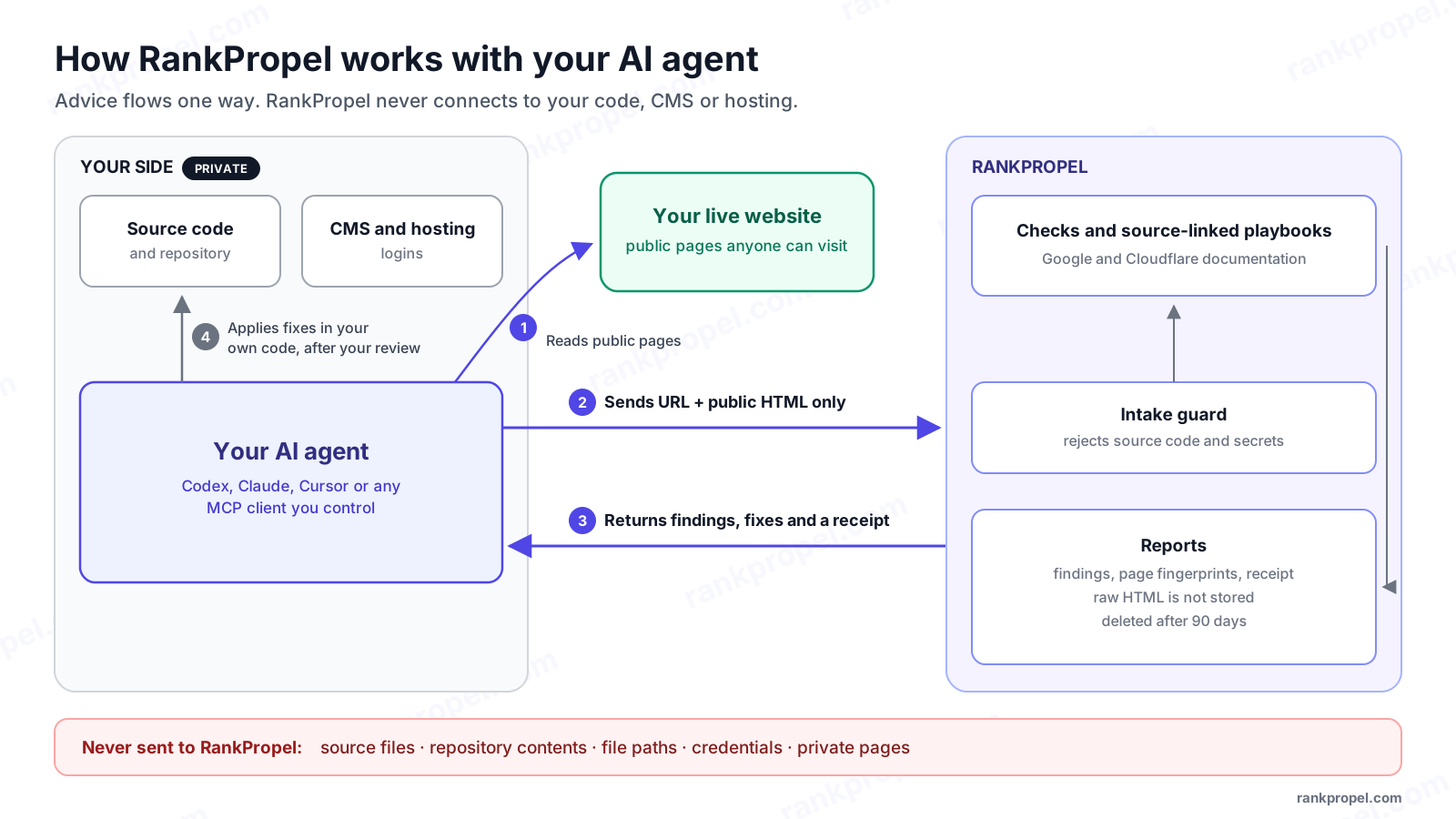
The four steps
- Your agent reads your public pages. It uses its own browser or fetch tool to collect what a visitor would receive.
- It sends RankPropel the URL and that public HTML. Nothing else is accepted: no files, no repository, no logins. Every URL must belong to the one website the agent's key is registered to.
- RankPropel returns findings, fixes and a receipt. Each finding describes the delivered page, cites the Google or Cloudflare documentation behind it, and includes a check to confirm the fix.
- Your agent applies fixes in your own code, after your review. RankPropel never sees where those changes go. Your agent maps "this page needs one canonical link" onto your codebase privately.
What happens to what you send
- Snapshots that look like source code are rejected. A React component, a PHP file or a server template is refused with a message telling the agent to send delivered HTML instead.
- Snapshots containing recognizable secrets are rejected. Private keys and API tokens are refused, and the error names the type of secret without repeating it.
- Scripts and comments are removed before checks run. Those are the parts of a page where secrets and build details usually hide. Structured data is kept because it is part of what gets audited.
- Raw HTML is not stored. Reports keep page URLs, a fingerprint of each page, the findings and short evidence excerpts.
- Every report includes a receipt. It lists what was received, how many script tags and comments were discarded, what was kept and the date the report will be deleted.
- Reports are deleted after 90 days. Organization owners can delete them sooner from the workspace.
Why not just connect my GitHub repository?
Because the boundary is the product. If RankPropel accepted repository or CMS access, every customer would have to trust us with their code and credentials, and every agency would have to get that approved by each client. Your agent already has access to your code, so it is the right place for edits to happen. RankPropel's job is to tell it what the live page should look like and how to check that it does.
Limits
Pattern checks cannot recognize every possible secret format, so the rule for agents is simpler: never send private pages or credentials at all. Audits evaluate the snapshots your agent submits. They do not independently confirm how Google crawls or indexes the page.
To connect an agent, start at RankPropel for agents. The full policy is in the privacy notice.