Subdomain or subfolder for your SaaS blog, docs or app: what Google documents and what it leaves open
Practitioners say subdomains split authority and subfolders inherit it. Google says to do what makes sense for your business. Here is what Google does document about hostnames (crawl budget, robots.txt, site names, Search Console, moves), and a decision table for blogs, docs, help centres and apps.
Should the blog live at blog.example.com or example.com/blog? For SaaS companies the question extends to docs, help centres, status pages, changelogs and the app itself. The industry answer is usually emphatic: a subdomain is said not to share authority with the main domain, and agencies routinely move subdomain blogs behind reverse proxies so they appear as subfolders.
Google's public answer is shorter. Its SEO Starter Guide says to do whatever makes sense for your business: subdirectories can be easier to manage, and subdomains can make sense for partitioning topics. SEO Starter Guide.
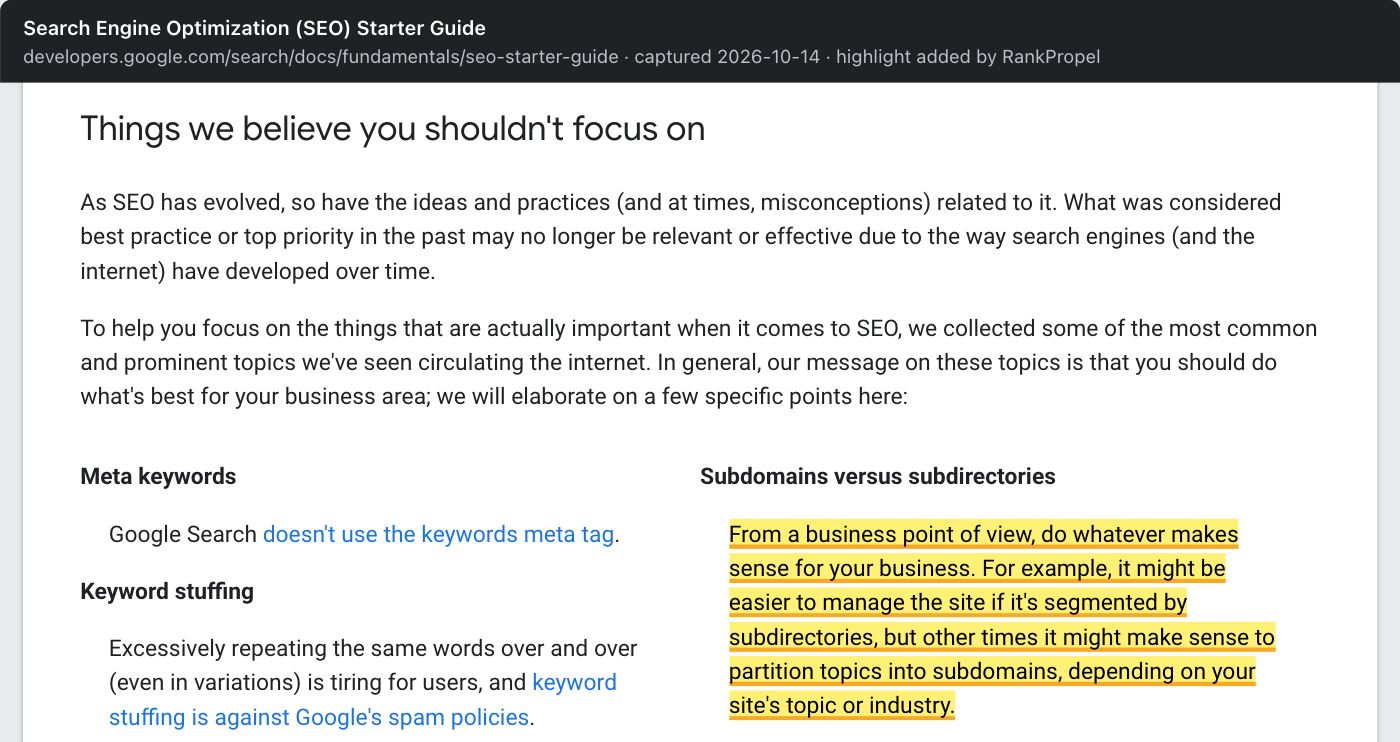
Source: Google Search Central, Search Engine Optimization (SEO) Starter Guide, captured October 14, 2026. Highlight added by RankPropel. Licensed CC BY 4.0.
Neither position settles how ranking signals flow between hosts. What Google does document is a set of concrete differences in how it treats a hostname. Those are enough to make a sound decision.
Sources checked October 13, 2026. This is a documentation review and a decision method. It reports no migration result of ours. We take no position on whether subfolders rank better.
What Google documents about hostnames
| Area | Subdomain (docs.example.com) |
Subfolder (example.com/docs) |
Source |
|---|---|---|---|
| Crawl budget | A separate site with its own crawl budget. Google's crawl-budget guide uses www.example.com and code.example.com as its example. |
Shares the host's crawl budget. | Crawl budget |
| robots.txt | Needs its own file. A robots.txt on one host is not valid for other subdomains. | Covered by the host's file. | robots.txt specification |
| Site name in results | Can have its own site name. Google supports one site name per domain or subdomain; www and m count as the domain. |
Cannot have its own; Google does not support site names at the subdirectory level. | Site names |
| Favicon | Supported for a subdomain-level home page. | Not supported for a subdirectory home page. | Favicons |
| Search Console | Included in a Domain property, or tracked as its own URL-prefix property. | Included in the host's properties; you can also add a URL-prefix property for the folder. | Property types |
| Infrastructure | Google's international guide lists easy separation and different server locations as subdomain advantages. | It lists low maintenance and a single host as subdirectory advantages, and harder separation as a drawback. | Multi-regional sites |
Two things in the table matter more than they look. Crawl budget is mostly a large-site concern: Google's guide is aimed at sites with over a million pages, or over 10,000 pages that change daily. A small SaaS blog will rarely notice it. The site-name and favicon rows are visible, though. A subdomain can show up in results under a different name and icon from your main site. Make sure it is intentional, or that the subdomain's home page names the brand clearly.
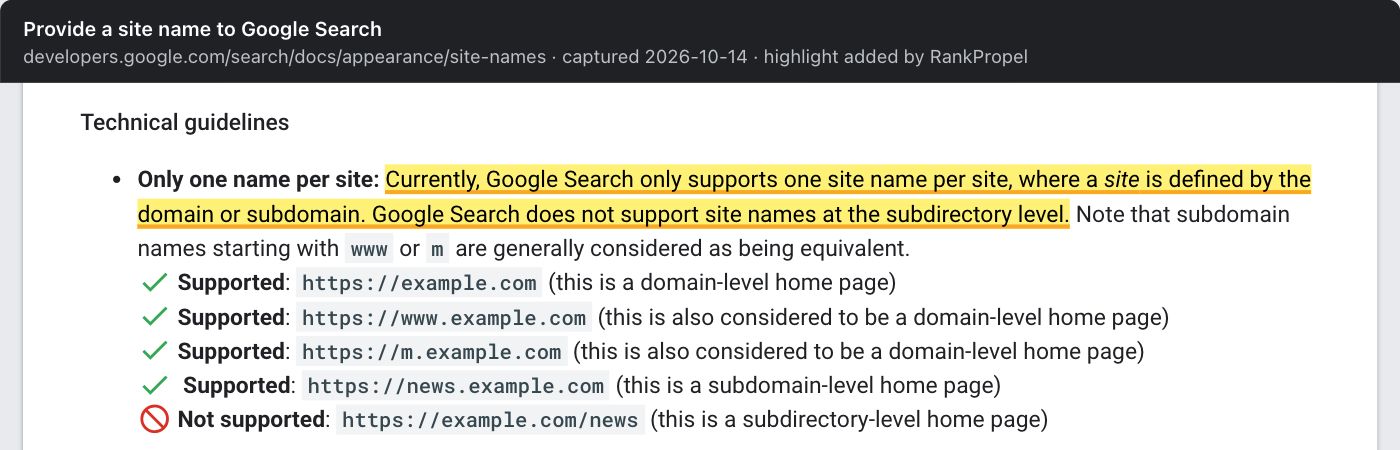
Source: Google Search Central, Provide a site name to Google Search, captured October 14, 2026. Highlight added by RankPropel. Licensed CC BY 4.0.
What Google does not document
- Authority inheritance. We found no current Google documentation saying ranking signals are shared between a domain and its subdomains, or kept apart. Claims in either direction, including appeals to the 2024 leaked API documentation, are inference. The Starter Guide's "business choice" line is the only direct statement.
- A per-subdomain quality score. Another common claim says Google scores quality per subdomain. Google does not document it.
- What to expect from a move. Practitioners report traffic gains after moving a blog into a subfolder. Moves usually change internal linking and content at the same time, and we have seen no controlled comparison.
One documented point cuts the other way. Google's spam policies treat creating new subdomains or subdirectories to keep violating its policies as circumvention, which can lead to broader action against a site. Spam policies. The host choice will not quarantine low-quality content either way.
A decision table for SaaS
These are RankPropel's defaults, reasoned from the documented differences above. They are not Google rules.
| Content | Default | Why |
|---|---|---|
| Marketing site, pricing, comparison and integration pages | Main host | These pages carry the brand and should sit together in navigation and internal links. |
| Blog and guides | Subfolder, unless the platform makes that costly | One robots.txt, one site name, simpler internal linking. If the blog must run on a separate platform, a subdomain is acceptable, as long as it is linked prominently from the main site and back. |
| Product docs and API reference | Either; follow your docs tooling | Docs generators often run separately. If on a subdomain, give it its own robots.txt, sitemap and a home page that names the product. |
| Help centre or knowledge base | Either | Third-party help desks usually need a subdomain. Make sure articles are crawlable <a href> pages, not script-only widgets. |
| Logged-in app | Subdomain such as app. |
It is not for search. Keep it out of the index deliberately rather than by accident, and keep its robots.txt separate from the marketing site's. |
| Status page, changelog | Either | Low search value. Decide on maintenance grounds. |
| Third-party or partner content you host | Avoid hosting it to borrow your ranking signals | Google's site reputation policy applies when third-party content is published on a host mainly because of the host's established ranking signals. Hosting third-party content is not a problem in itself. |
If you decide to move
Moving a blog from a subdomain into a subfolder is a site move with URL changes in Google's terms. Google's examples include merging hostnames. Site moves with URL changes. The documented essentials:
- Map every old URL to one new URL, and redirect each with a permanent server-side redirect (301 or 308). Redirects and Google Search.
- Update internal links to the new URLs, rather than relying on redirects.
- Submit the new sitemap and watch both hosts in Search Console.
- Expect some temporary movement. Google says visibility may fluctuate during a move, and a small to medium site can take a few weeks for most pages to move.
A reverse proxy that serves the subdomain's content under a subfolder is a common way to do this without changing the blogging platform. It still changes URLs, so the same steps apply. Our migration runbook has the full checklist.
Before moving, write down what you expect to change and how you will check it: impressions and clicks for the moved pages against comparable pages that did not move, over the same weeks. If the honest answer is "we don't know", the move needs a reason beyond SEO, such as one CMS, one analytics setup or one brand.
Checklist
- Each content type assigned to a host for a stated business or maintenance reason
- Every subdomain has its own robots.txt and, if indexed, a sitemap
- Subdomain home pages name the brand; site name and favicon checked in results
- A Domain property in Search Console so every host is visible in one place
- Main site and subdomains link to each other with crawlable links
- Any move planned as a site move: URL map, 301/308s, internal links updated, measurement window chosen first