Core Web Vitals and rankings: what Google says they do, what they don't, and how to read your own data
Google says Core Web Vitals are used by its ranking systems, that good scores don't guarantee top rankings, and that relevance comes first. Here are the current metrics and thresholds, the difference between field and lab data, and a work order for SaaS and indie sites.
Two opposite claims about Core Web Vitals circulate in SEO. One says they are a major ranking factor, so every page needs a perfect score. The other says they do nothing for rankings, so ignore them. Both are easy to sell. A green PageSpeed score makes a satisfying audit deliverable, and "speed doesn't matter" saves a sprint.
Google's documentation takes a middle position, and says so plainly. This article sets out what it says, the metrics and thresholds that apply now, and how to tell the data that counts from the data that is easy to produce.
Sources checked October 14, 2026. This is a documentation review and RankPropel's suggested work order. It reports no speed experiment of ours.
What Google says about ranking
From Google's page experience documentation, Understanding page experience (page dated 2026-09-22):
- There is no single "page experience signal". Google's core ranking systems look at a variety of signals that align with overall page experience.
- Core Web Vitals are used by its ranking systems, and Google recommends achieving good Core Web Vitals.
- Good results in Search Console's Core Web Vitals report or in third-party tools do not guarantee top rankings. Chasing a perfect score just for SEO may not be the best use of your time.
- Other page experience aspects (for example HTTPS, mobile display, intrusive ads) do not directly help a site rank higher. They make it more satisfying to use, which aligns with what ranking systems seek to reward.
- Google always seeks to show the most relevant content, even if page experience is sub-par. When many pages are equally helpful, a great page experience can contribute to success.
- Ranking systems generally evaluate page experience page by page, with some site-wide assessments.
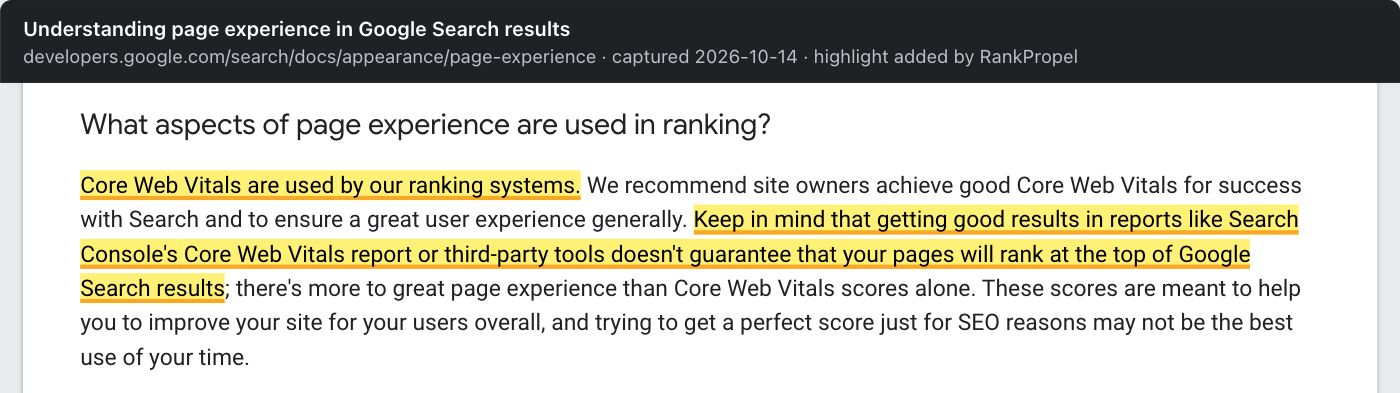
Source: Google Search Central, Understanding page experience in Google Search results, captured October 14, 2026. Highlight added by RankPropel. Licensed CC BY 4.0.
Two common phrasings are not Google's. "Tiebreaker" is an industry shorthand. It is close to Google's "when there is lots of helpful content available", but Google does not use the word. "Speed hurts rankings through bounce-backs to the results page" is a theory. Google's page experience documentation describes no such mechanism.
The metrics and thresholds
| Metric | Measures | Good | Source |
|---|---|---|---|
| Largest Contentful Paint (LCP) | Loading | Within 2.5 seconds of the page starting to load | Core Web Vitals in Search |
| Interaction to Next Paint (INP) | Responsiveness | Under 200 milliseconds | same |
| Cumulative Layout Shift (CLS) | Visual stability | 0.1 or less | same |
Google's web.dev guidance adds how to judge a page: measure at the 75th percentile of page loads, separately for mobile and desktop. A page passes when it meets all three targets at that percentile.
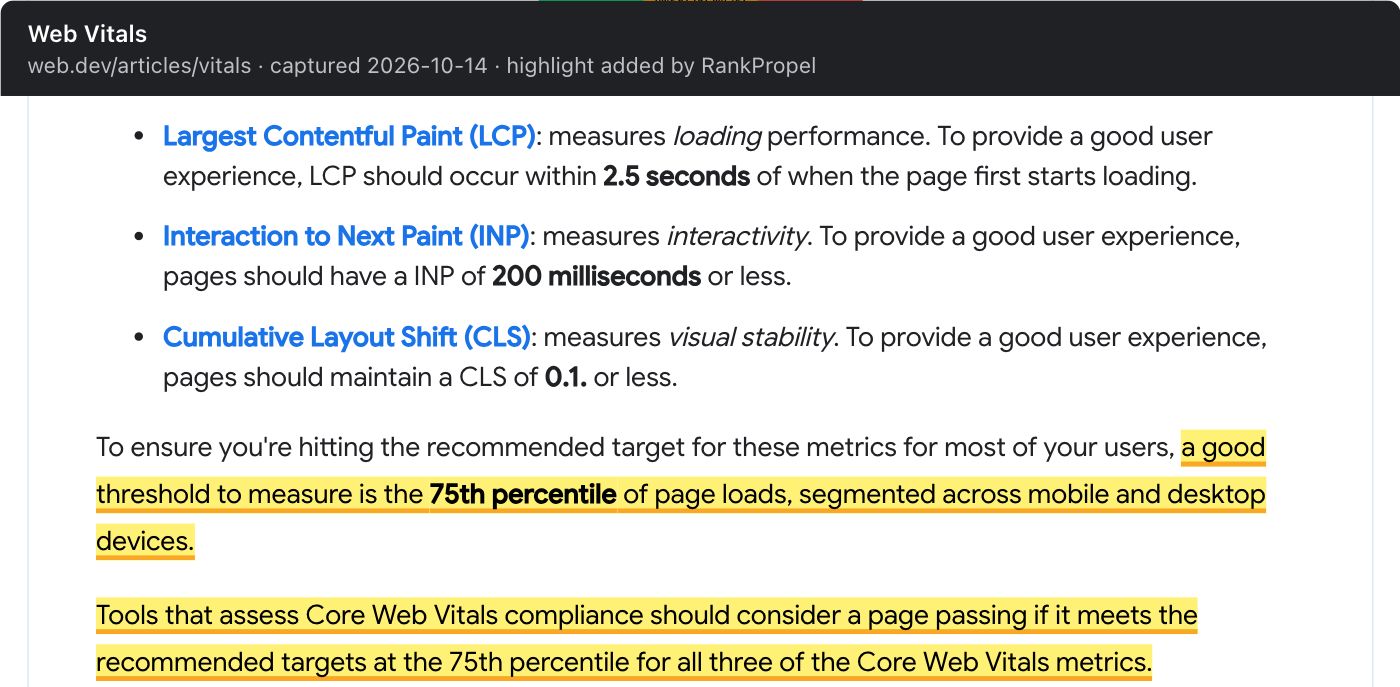
Source: web.dev, Web Vitals, captured October 14, 2026. Highlight added by RankPropel. Licensed CC BY 4.0.
INP replaced First Input Delay as a Core Web Vital on March 12, 2024. Chrome team announcement. Advice, audits or tools that still report FID as a Core Web Vital are out of date.
Field data is what counts; lab data is for debugging
Search Console's Core Web Vitals report is built on real-world usage data, also called field data, from the Chrome UX Report (CrUX). Core Web Vitals report. CrUX collects data from real Chrome users who meet its eligibility conditions. CrUX overview.
How the report works:
- URLs are grouped with similar pages. Each group gets the status of its worst metric, so a group with poor CLS and good INP is "Poor".
- Each figure is the 75th percentile over the last 28 days.
- Groups without enough data are left out. A "No data available" screen means the property is new or CrUX does not have enough data for that device type.
PageSpeed Insights and Lighthouse run a test on demand. Google's report documentation points to them for testing individual URLs, but a lab run is one load on one simulated device. It is useful for finding the cause of a problem and checking a fix before release. It is not the measurement Google's report uses.
For small sites this matters a lot. Many indie and early-stage SaaS sites have no field data at all. In that case there is no Core Web Vitals assessment to improve in Search Console. Lab tests can still catch real problems such as a hero image that loads late or a cookie banner that shifts the layout.
A work order
This is RankPropel's method.
- Check what data you have. Open the Core Web Vitals report for mobile and desktop. Note whether groups show data, and which templates (pricing page, blog post, docs page) the poor groups belong to.
- Fix templates, not URLs. Groups are usually one template. A fix to the blog layout fixes every post.
- Prioritise pages that matter to the business. A poor group of tag archives matters less than a poor pricing or signup page.
- Debug in the lab, confirm in the field. Use Lighthouse or PageSpeed Insights to find the cause. Field data shows whether real users improved, which takes up to 28 days to reflect fully.
- Measure conversions separately. If you expect faster pages to convert better, test that in your analytics with a before-and-after window and a comparison. It is a business hypothesis, not something Google's documentation states.
- Stop at "good". Google says a perfect score is not required for ranking. Once the three metrics are good at the 75th percentile, put the time into content and pages people need.
What to ignore
- A single lab score presented as the result of an engagement.
- Tools or audits that still list FID.
- Promises that fixing Core Web Vitals will restore lost rankings. Google says relevance comes first and good scores guarantee nothing.
Checklist
- Core Web Vitals report checked for mobile and desktop; data availability noted
- Poor groups mapped to templates
- Commercially important templates fixed first
- Lab tests used for diagnosis; field data used to confirm
- INP, not FID, in every report
- Conversion effects tested separately, if claimed
Related: How to vet an SEO or GEO agency, which covers green-score deliverables, and Answer-first page shape.