Cloudflare has no spending cap. Here are the safeguards we put around an agent API on Workers.
A build log of the cost and abuse controls on RankPropel's agent API: escalating budget alerts, usage alerts, a WAF rate limiting rule tested with a real burst, per-key limits in the Worker, early rejection and monthly caps. With measured CPU costs and links to Cloudflare's current pricing.
RankPropel's agent API runs on Cloudflare Workers. Workers bill by usage, and Cloudflare does not offer a setting that stops usage at a dollar amount. If a script loops, a key leaks or someone floods an endpoint, the bill keeps growing until a person notices.
So "a person notices" has to happen early, and the cheapest requests have to be rejected before they cost anything. This post lists what we set up on October 14, 2026, what each layer does and does not do, and the numbers we measured.
Status, October 14, 2026. Prices and plan limits below were checked against Cloudflare's documentation on that date. Screenshots are from the Cloudflare dashboard, with the domain, email and actual spend replaced by placeholders.
What a request actually costs
On the Workers Paid plan (minimum $5 per month per account), the Standard usage model includes 10 million requests and 30 million CPU milliseconds a month. Beyond that, requests cost $0.30 per million and CPU time costs $0.02 per million milliseconds. Requests for static assets are free. Time spent waiting on the network is not billed, only CPU time.
We measured RankPropel's own workload against those numbers:
- Audits. An audit is a set of deterministic HTML checks with no AI model call. The heaviest case we could construct, 10 page snapshots of 100 KB each, used about 110 ms of CPU warm and about 250 ms on a cold run. That was measured locally, not at the edge. At overage rates, 250 ms of CPU is about $0.000005.
- Share of the allowance. Over the 30 days to October 14, RankPropel served about 21,000 Worker requests and used about 1.8 million CPU ms. That is 0.2% of the included requests and about 6% of the included CPU time.
- Worst case for an internal account. Our owner workspace is capped at 200,000 requests a month. If every one of those cost 85 ms of CPU, the average for a rendered page, the total would be 17 million CPU ms, or about $0.34 if all of it were billed as overage.
The point of the arithmetic: normal traffic is not the risk. The risk is traffic nobody intended, which can be orders of magnitude larger than normal. Every layer below is aimed at that.
Layer 1: budget alerts that start low
Budget alerts send an email when the account's usage-based spend for the billing period crosses a dollar threshold. Three details matter:
- They are email only, and informational only. Cloudflare's documentation says they "do not pause or cap usage."
- Each alert fires once per billing period when crossed, then resets.
- They cover the whole account, all usage-based products combined.
Because each alert fires only once, one alert at $50 tells you about a problem once, possibly late. We set a ladder instead, so a runaway month produces an email at every step: $5, $10, $15, $25, $50 and $100. All go to the account owner's inbox.
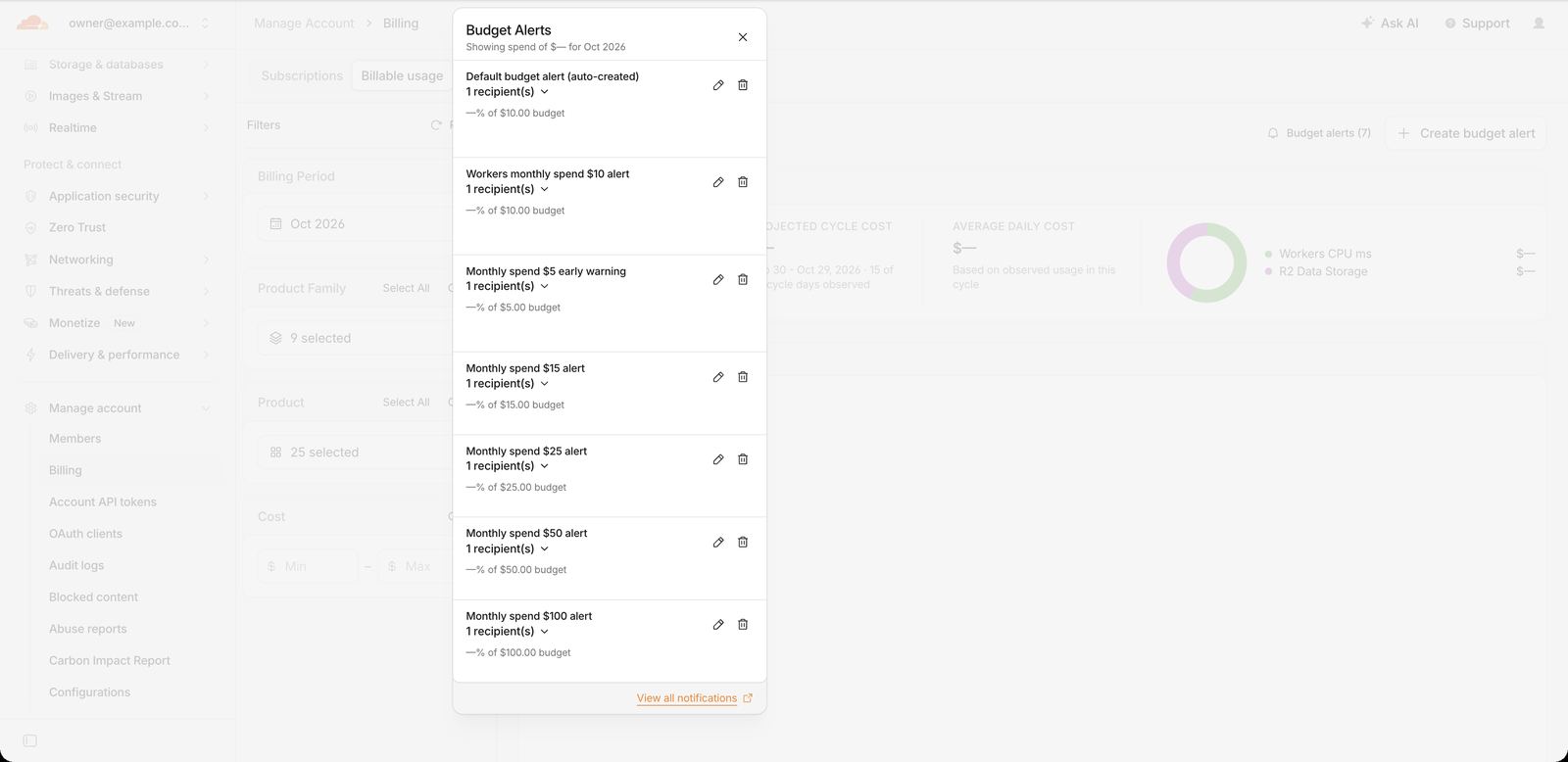
To create one: Manage Account > Billing > Billable Usage > Create budget alert, then enter a name, a threshold in USD and recipients. One practical note if you script the dashboard: the threshold field starts at 10, and typing into it without clearing it first turns "5" into "105". Check the saved list afterward. We had to edit four alerts for exactly this reason.
Per-product usage alerts
Dollar alerts tell you that money is being spent, not where. Cloudflare also has usage-based billing notifications under Notifications > Create an alert > Usage based billing, which fire on a product metric instead of a dollar amount. We added two:
- Workers Standard Requests above 8 million in a month, which is 80% of the included 10 million.
- Workers Standard CPU milliseconds above a monthly threshold set above the current run rate, so it fires only when CPU use departs from the normal trend.
Pick thresholds from your own billable usage page. A threshold below what you already use fires on day one and teaches you to ignore it.
Layer 2: a WAF rate limiting rule in front of the Worker
A WAF rate limiting rule runs at Cloudflare's edge before the request reaches the Worker. A blocked request never starts the Worker, so it is not billed as a Worker request and uses no CPU time.
On the Free zone plan, the limits are tight:
| Free plan limit | Value |
|---|---|
| Rate limiting rules per zone | 1 |
| Counting characteristic | IP address |
| Counting period | 10 seconds |
| Mitigation timeout | 10 seconds |
| Fields in the rule expression | Path, Verified Bot |
Our plan was to add a rule just for the API paths: block an IP for 10 seconds after 50 requests in 10 seconds to /api/agent or /mcp. When we opened the zone, its one rule was already in use by a broader rule created earlier: any request that is not from a known bot and is not a static /_next/ or /cdn-cgi/ path, 120 requests per 10 seconds per IP, then block for 10 seconds. That rule already covers both API paths, so we kept it rather than replacing site-wide protection with API-only protection. A separate, stricter API rule would need a second slot, which means the Pro plan (two rules).

Testing it with a real burst
A rate limit you have not tested is a guess. We sent 180 unauthenticated POST requests to /api/agent from one machine, 45 at a time:
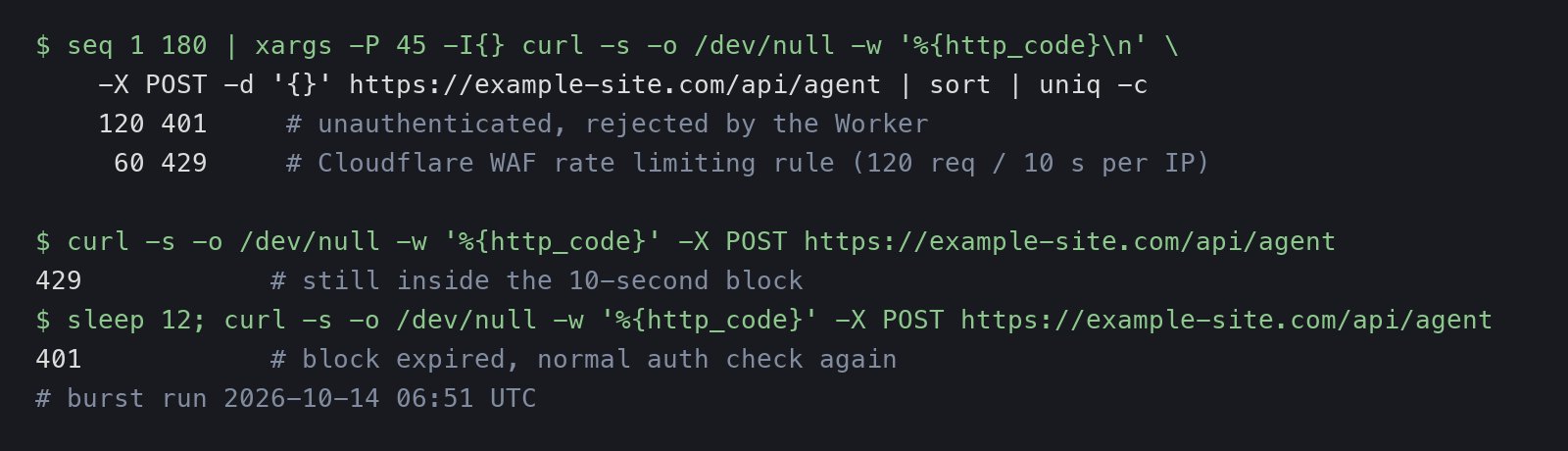
The first 120 reached the Worker and got a 401, because they had no key. The remaining 60 got a 429 from Cloudflare and never ran the Worker. Twelve seconds later the IP was unblocked and back to normal 401s.
The result matched the configured threshold exactly, but do not rely on that precision. Cloudflare's documentation says counters can lag "up to a few seconds" and are kept per data center, so some excess requests can get through, and a flood spread across many data centers is counted separately in each. The rule caps the damage from a single noisy client. It is not an exact quota.
Layer 3: a per-key limit inside the Worker
The edge rule counts by IP. Agent traffic is better counted by API key: one customer's agent may run from many IPs, and many customers may share one office or cloud IP. Cloudflare's own Rate Limiting binding documentation recommends keys such as API keys or user IDs over IP addresses for this reason.
RankPropel uses a Workers Rate Limiting binding with 120 requests per 60 seconds per agent key. The order of operations matters more than the number:
- Check that the
Authorizationheader has the right shape. If not, return 401. - Hash the key and call the rate limiter with the hash. If over the limit, return 429.
- Only then query the database to look the key up.
The binding allows a period of 10 or 60 seconds only. It is local to each Cloudflare location and, in the documentation's words, "permissive, eventually consistent, and intentionally designed to not be used as an accurate accounting system." It is there to absorb loops and retry storms cheaply, not to enforce billing.
Layer 4: reject before reading the body
A request body costs CPU time to read and parse. The agent endpoint rejects two kinds of requests before touching the body:
- No valid key: 401 before the body is read, and before any database query.
- Declared size over about 1.1 MB: if the
Content-Lengthheader is larger than the limit, the endpoint returns 413 immediately. Requests without that header are still capped while streaming, so an undeclared large body is cut off at the same limit.
The burst test above shows the first rule working: 120 requests with no key cost the Worker almost nothing.
Layer 5: make background work proportional
Reports expire after 90 days. The first version of the cleanup ran a DELETE ... WHERE created_at < ? on every audit and account page load, and the table had no index on created_at, so each run had to scan rows to find expired ones. Two changes fixed that:
- An index on
created_at, so the delete reads only expired rows. - The cleanup runs at most once an hour per Worker instance instead of on every request.
Neither change was urgent at RankPropel's current volume. Both remove a cost that would otherwise grow with traffic, which is the kind of cost that surprises you later.
Layer 6: monthly caps per customer
The only limit here that is actually hard is in the application. Each organization has a monthly allowance of websites, page evaluations, reports and requests, stored in the database, with no automatic overage. When a customer's agent reaches the cap, it gets a clear error instead of an invoice. Every layer above reduces how often that cap matters. This one bounds what any single account can cost us in a month.
One setting we checked and left alone
Bot Fight Mode is on for this zone. It challenges traffic that looks automated, and according to Cloudflare's documentation it cannot be bypassed with WAF custom rules or Page Rules, so you cannot exempt an API path from it. An agent API is, by definition, automated traffic. Our burst test from a plain command-line client reached the Worker normally, so it is not blocking API calls today. If you turn it on for a zone that serves an API, test from the same kind of client your customers use, and watch for challenge pages in place of JSON.
The checklist
- Create a ladder of budget alerts, starting below your normal monthly spend.
- Add usage alerts for the products that can grow fastest, such as Worker requests and CPU time.
- Put a WAF rate limiting rule in front of the Worker, then send a burst of requests to confirm it fires.
- Rate limit by API key inside the Worker, before any database query.
- Reject missing keys and oversized bodies before reading the body.
- Index the columns your cleanup jobs filter on, and run cleanup on a schedule rather than on every request.
- Enforce monthly caps in your own database. Cloudflare will not do it for you.
RankPropel's agent API, with these limits in place, is documented on the agents page.