When /robots.txt returns your homepage — the Cloudflare Pages SPA-fallback trap
If you deployed a static site to Cloudflare Pages without an explicit robots.txt or sitemap.xml file, you're serving your homepage HTML at those URLs. Bots see junk. Here's the trap and the one-minute fix.
A discovery URL can return a successful HTTP response while serving the wrong document. This technical note by LIPAI WANG explains how to check for homepage HTML at robots and sitemap endpoints. Website identities, ownership details and audit counts are withheld.
The mechanism
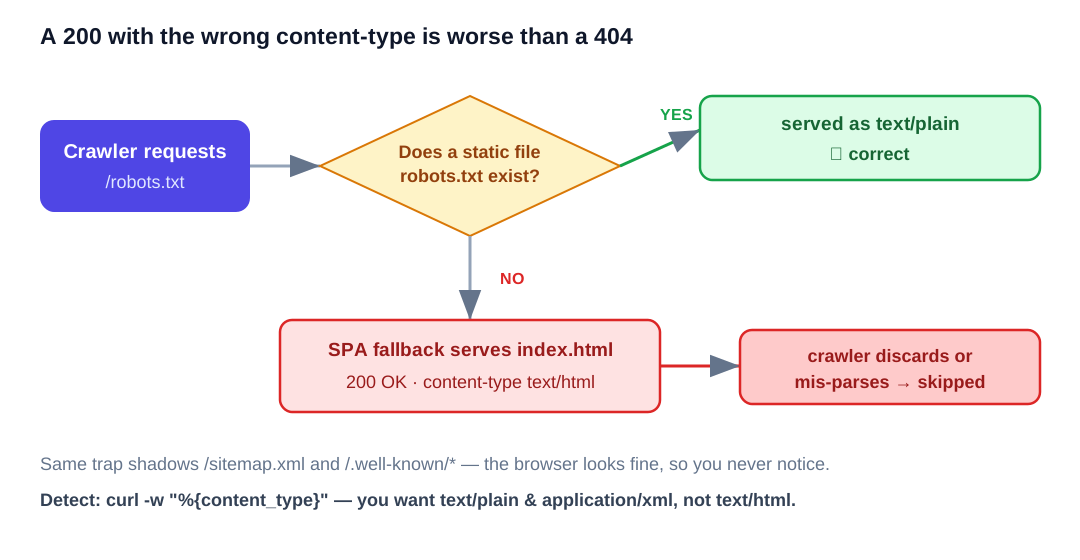
Cloudflare Pages serves your index.html as the default fallback for any path that doesn't match a static asset or a Function. This is the right default for client-side-routed SPAs — visit /dashboard/settings, you get index.html, the JS router takes over.
But there's a side effect: when a crawler asks for /robots.txt and you haven't shipped a robots.txt file in your deployment, Cloudflare returns... index.html. Same for /sitemap.xml. Same for /llms.txt. Same for /.well-known/anything.
The response is a 200 OK, content-type text/html. Crawlers that strictly check content type will discard it as malformed. Crawlers that try anyway will fail to parse and silently skip indexing.
How to detect
For each of your sites:
curl -s -o /dev/null -w "HTTP:%{http_code} CT:%{content_type}\n" \
  https://your-domain.com/robots.txt
curl -s -o /dev/null -w "HTTP:%{http_code} CT:%{content_type}\n" \
  https://your-domain.com/sitemap.xml
What you want:
HTTP:200 CT:text/plain
HTTP:200 CT:application/xml
What's broken (the trap):
HTTP:200 CT:text/html; charset=utf-8
HTTP:200 CT:text/html; charset=utf-8
If you see text/html for either, the SPA fallback caught the request. The file isn't actually there.
A 404 on /sitemap.xml is actually fine if your robots.txt correctly points to a different sitemap URL (like sitemap-index.xml). Search engines try /sitemap.xml by default but defer to whatever robots.txt declares.
The fix for static sites (HTML+CSS+JS deploys)
If you're deploying with wrangler pages deploy . and your repo has index.html at root, add two files at the same root level:
robots.txt:
User-agent: *
Allow: /

# AI search and assistant crawlers — explicit allows
User-agent: GPTBot
Allow: /

User-agent: ChatGPT-User
Allow: /

User-agent: OAI-SearchBot
Allow: /

User-agent: ClaudeBot
Allow: /

User-agent: PerplexityBot
Allow: /

User-agent: Google-Extended
Allow: /

User-agent: Applebot-Extended
Allow: /

User-agent: CCBot
Allow: /

Host: https://your-domain.com
Sitemap: https://your-domain.com/sitemap.xml
sitemap.xml (minimum — homepage only; expand as you add routes):
<?xml version="1.0" encoding="UTF-8"?>
<urlset xmlns="http://www.sitemaps.org/schemas/sitemap/0.9">
  <url>
    <loc>https://your-domain.com/</loc>
    <lastmod>2026-05-17</lastmod>
    <changefreq>weekly</changefreq>
    <priority>1.0</priority>
  </url>
</urlset>
Redeploy. The static files now exist, so Pages serves them before falling back to index.html.
The fix for Next.js on Cloudflare Pages (OpenNext adapter)
Next.js 13+ supports dynamic robots.ts and sitemap.ts files under app/. They generate /robots.txt and /sitemap.xml at request time.
But on Cloudflare Pages with the OpenNext adapter, you need the build to generate a correct _routes.json so requests for these paths route to the worker (which renders the dynamic file) rather than to static asset lookup (which falls back to index.html).
The right _routes.json includes everything by default and only excludes truly-static asset extensions:
{
  "version": 1,
  "include": ["/*"],
  "exclude": [
    "/_next/static/*",
    "/favicon.ico",
    "/_next/image*",
    "/*.png",
    "/*.jpg",
    "/*.svg",
    "/*.ico",
    "/*.webp",
    "/*.woff2",
    "/*.woff",
    "/*.css",
    "/*.js"
  ]
}
Critically: robots.txt and sitemap.xml are not in the exclude list. They route to the worker, the worker runs your robots.ts/sitemap.ts, the response is correct.
If your build script generates _routes.json from a template like the above, you're fine. If you skipped generating _routes.json entirely, every path goes to the worker — which also works.
A stale deployment is one possible cause: source files and routing configuration may be correct while the published artifact still contains old assets. Compare the deployed response with the intended source before deciding whether rebuilding is the right repair.
A side trap: SPA fallback shadowing .well-known/*
Same mechanism, different consequences. If you ever need to host .well-known/security.txt, .well-known/apple-app-site-association, .well-known/assetlinks.json, or any other well-known URI, the SPA fallback will serve index.html there too. Bots, security scanners, and OS-level handlers all expect a specific content type.
Ship those as real files in your deploy directory.
Why this is so easy to miss
When you visit /robots.txt in a browser, you see your homepage and your brain registers "oh, I went to the wrong URL." You don't realize the URL is correct and the server is wrong. The check requires curl, or DevTools network tab, or a dedicated SEO crawler.
A repeatable check can record each endpoint's status, media type and body. Confirm the cause before making changes, then repeat the same checks against production.