Cloudflare's 'Manage robots.txt' will silently block GPTBot, ClaudeBot, and Perplexity if you let it
I audited 25 of my own Cloudflare-hosted indie sites in May 2026 and found 6 of them invisibly blocking every major AI crawler. Here's what's happening, how to detect it in 30 seconds, and how to fix it.
I run a lot of small sites. Twenty-five live ones on Cloudflare Pages as of this week, mostly indie SaaS, niche-content, and personal-brand sites. I'm writing the GEO course at RankPropel, so I figured it was time to eat my own dog food and audit them.
Six of the twenty-five — almost a quarter — were silently blocking every major AI crawler. Not because I wrote any code that did that. Because Cloudflare did it for me, by default, without flagging it as a tradeoff.
This article is what I found, why it matters, and the exact 30-second check + fix.
What's actually being served
When I curl https://[one-of-my-sites]/robots.txt, here's what I got:
# As a condition of accessing this website, you agree to abide by the following
# content signals:
# ...
# (long explanatory header from Cloudflare)
# ...

User-agent: *
Content-Signal: search=yes,ai-train=no
Allow: /

User-agent: Amazonbot
Disallow: /

User-agent: Applebot-Extended
Disallow: /

User-agent: Bytespider
Disallow: /

User-agent: CCBot
Disallow: /

User-agent: ClaudeBot
Disallow: /

User-agent: CloudflareBrowserRenderingCrawler
Disallow: /

User-agent: Google-Extended
Disallow: /

User-agent: GPTBot
Disallow: /

User-agent: meta-externalagent
Disallow: /

# END Cloudflare Managed Content

User-Agent: *
Allow: /
Disallow: /api/cron
Disallow: /dashboard

Sitemap: https://example.com/sitemap.xml
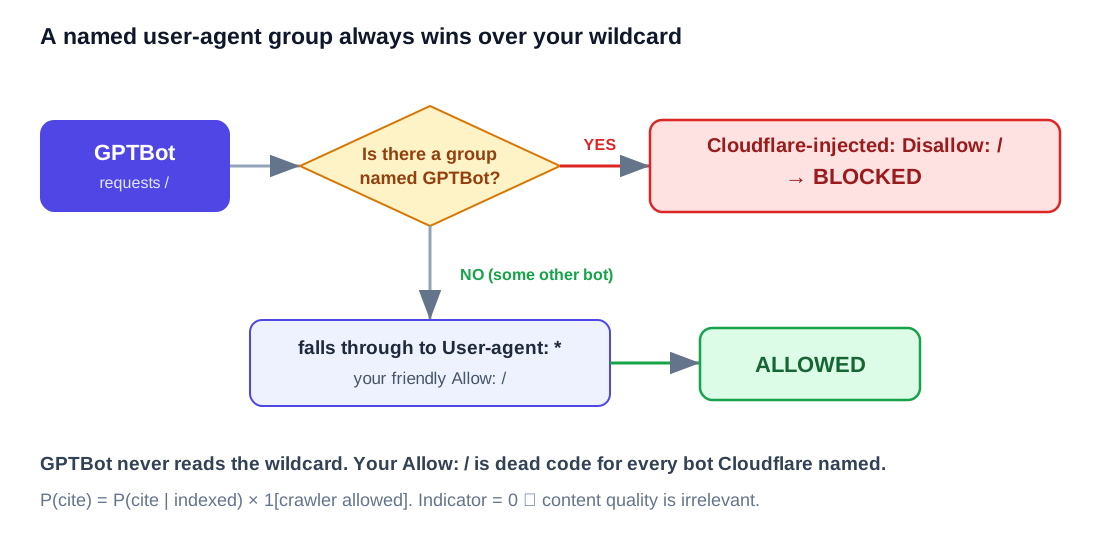
Read that carefully. My own robots.txt (the part after END Cloudflare Managed Content) says Allow: / for everyone. But before it, Cloudflare inserted explicit Disallow: / rules for every named AI crawler.
In the robots.txt spec, a named user-agent rule wins over User-agent: *. So GPTBot, ClaudeBot, Google-Extended (the AI Overview training signal), CCBot (Common Crawl, which feeds most open-source LLM training sets and is also used by Perplexity-aligned crawlers), Bytespider (TikTok), Amazonbot, and Applebot-Extended all see "you are not allowed here" before they ever read my own rule.
Why this is in your robots.txt without you knowing
In 2025–2026 Cloudflare rolled out two related features under the Bot Management umbrella:
- "Block AI Scrapers and Crawlers" — a one-click toggle that, when on, appends
Disallow: /stanzas for known AI bots to your robots.txt. - "Content Signal Policy" — adds the
Content-Signal: search=yes,ai-train=noheader line and the explanatory comments at the top.
Both can be enabled by default on free zones added during certain promotional pushes, or by clicking through onboarding without realizing what you're toggling. Cloudflare doesn't show you a diff of what they're injecting into robots.txt; you only see it if you fetch the file yourself.
The intent is reasonable — protect site owners from AI training without consent. But the side effect is severe for any site that wants to be cited in AI search surfaces, because the same bots that train models are also the bots that crawl for real-time AI search: ChatGPT Search, Perplexity, Claude with web access, Google's AI Overviews via the Google-Extended signal.
If you block ClaudeBot, you don't appear in Claude's web answers. If you block GPTBot, you don't appear in ChatGPT Search. If you block Google-Extended, you may not appear in AI Overviews (this is debated — Google says no, but the optics matter). If you block CCBot, you're out of most Common Crawl-derived datasets including some Perplexity scoring inputs.
Six of my twenty-five sites were doing this. I had no idea until I curled them.
How to check, in 30 seconds
Pick any of your Cloudflare-hosted domains and run:
curl -s https://your-domain.com/robots.txt | head -50
If you see any of these in the output, Cloudflare is managing your robots.txt:
- The line
Content-Signal:anywhere - The comment
END Cloudflare Managed Content - Multiple
User-agent: GPTBot/ClaudeBot/CCBotblocks withDisallow: /that you don't remember writing
Run this against every public domain you own. Took me about 20 seconds per site.
The fix
You have three paths.
Path A (fastest, API): one curl per zone. This is how I fixed all seven of my affected sites in under a minute total. Create a Cloudflare API token at dash.cloudflare.com/profile/api-tokens with Zone:Read + Bot Management:Edit + All zones from account. Then:
export CF_API_TOKEN=...
curl -X PUT -H "Authorization: Bearer $CF_API_TOKEN" \
  -H "Content-Type: application/json" \
  "https://api.cloudflare.com/client/v4/zones/<ZONE_ID>/bot_management" \
  --data '{
    "ai_bots_protection": "disabled",
    "is_robots_txt_managed": false,
    "cf_robots_variant": "off"
  }'
All three fields matter. ai_bots_protection: disabled stops the named-bot Disallow stanzas. is_robots_txt_managed: false stops Cloudflare from wrapping your robots.txt at all. cf_robots_variant: off removes the Content Signal Policy header (with its EU Article 4 reservation language) — without this, you'll still see the policy preamble even if the bot Disallows are gone.
A common myth: "Bot Management is Enterprise-only." That's the bot detection features (fight mode, JS challenge, etc.). The AI bot toggle is exposed to all plans via the same endpoint. The 401 you get with a default token is a permission issue, not a plan issue — add Bot Management:Edit and it works on Free.
Path B (dashboard, one toggle per zone). Same effect, manual. Go to:
Cloudflare Dashboard → [zone] → Security → Bots
Find the toggle labelled something like "Block AI Bots", "Manage robots.txt", or "Content Signal Policy" (the wording varies; Cloudflare renames these panels every few months). Turn it off, save.
After either Path A or B, fetch your robots.txt again. You should now see only the file your application serves at /robots.txt — no Cloudflare-injected stanzas, no Content-Signal: line, no END Cloudflare Managed Content comment.
Path B: Keep blocking AI training, allow AI search. If you genuinely don't want your content used for training but do want to be cited in real-time AI search, the matrix is messier. As of mid-2026:
| Bot | Used for | Want allowed? |
|---|---|---|
| GPTBot | OpenAI training | No (if anti-training) |
| OAI-SearchBot | ChatGPT Search real-time | Yes |
| ChatGPT-User | ChatGPT user-triggered fetches | Yes |
| ClaudeBot | Anthropic training + Claude with web access | Yes (it's both) |
| Claude-Web | Claude.ai web fetches | Yes |
| PerplexityBot | Perplexity search index | Yes |
| Perplexity-User | Perplexity user-triggered fetches | Yes |
| Google-Extended | Bard/Gemini training (not Google Search) | Disputed |
| CCBot | Common Crawl (training datasets) | No (if anti-training) |
| Applebot-Extended | Apple training | No (if anti-training) |
If you want this matrix, you need to write your own robots.txt explicitly — Cloudflare's managed mode doesn't expose this granularity. Disable the managed feature, then ship a real robots.txt in your repo that allows the search-bots and blocks the training-bots.
Why this matters more than it sounds
Six of twenty-five is 24%. If that ratio holds across the indie-Cloudflare-Pages population — and I have no reason to think my sites are unusual — there are hundreds of thousands of small sites today that are accidentally invisible to ChatGPT Search, Perplexity, Claude, and AI Overviews. Their owners think they're "doing SEO" because they have a sitemap and good content. But the bots can't reach them.
GEO competition is currently won by people who are present in the index. Not by people with the best content. If a site with mediocre content is allowed and your great content is blocked, the mediocre one gets cited. The barrier to entry is "not be invisible."
This is the cheapest GEO win there is — a single toggle, zero code, zero deploy, immediate effect on the next crawl.
What I changed
After this audit, I disabled the Cloudflare managed robots.txt on all six affected zones and replaced the wrapper with explicit per-bot Allow: / rules where I had a choice, and a sitemap reference.
I also added IndexNow keys to those sites — which I cover in a separate gotcha article — so Bing, Yandex, and Naver get pinged the moment content changes.
If you've got a portfolio of small sites the way I do, do this audit first before you write a single new article. It costs you a couple minutes and you'll almost certainly find at least one site silently dropping AI citations.